Community
Gigi's Rainbow Colors
@sheila.lag.1e54Pixar-style 3D · 9:16 · 6 scenes · 0:302 views
Sign up free to remixGigi's Rainbow Colors is an AI-generated music video made with TubeTube in the Pixar-style 3D visual style, 0:30 long across 6 scenes. Scene images were generated with Gemini 3 Pro and animated with Kling 2.5 Pro. The full recipe below is remixable: reuse the same style and settings with your own words.
Scenes 6 frames
The exact frames generated for this video - remix the recipe to make your own with the same look.
Lyrics as sung in the video
[Spoken] HIIIII! Wanna sing with Gigi? Red, red, red — like an apple so bright! Blue, blue, blue — like the sky in the light! Yellow, yellow — sunshine, warm and fun! Green, green, green — like the grass in the sun! Pink is pretty, purple too, Orange says, “Hello to you!” Rainbow colors, one by one — Sing with Gigi, colors are fun!
The prompts copy anything
Image style
High-quality polished 3D children’s animation with soft rounded forms, warm cinematic lighting, smooth skin, expressive but natural facial features, large sparkling blue eyes, soft realistic blonde hair with defined curls, vibrant pastel colors, gentle depth of field, and clean professional family-animation rendering.
Gigi must match the supplied Gigi reference images exactly and remain the same character in every scene: a sweet 6-year-old stylized girl with fair warm skin, rosy cheeks, very large bright sparkling blue eyes, a small button nose, a warm happy smile, blonde hair in a high voluminous curly ponytail with soft face-framing curls, a pink heart tiara, pastel rainbow tie-dye short-sleeve top, layered sparkly pink ruffled skirt with gold trim, pink high-top sneakers with white details, white frilly socks, pink heart earrings, a pink bracelet, and a heart necklace.
Gigi should always look cute, sweet, youthful, polished, and friendly — never uncanny, robotic, doll-like, flat, distorted, overly realistic, or mature-looking. Preserve her face shape, eye color, hairstyle, age, body proportions, clothing, accessories, and overall identity consistently across all scenes.
Use bright, clean, colorful toddler-friendly environments with soft pastel backgrounds, magical sparkles, stars, hearts, flowers, rainbows, and gentle glowing accents. Keep backgrounds visually appealing but uncluttered so Gigi remains the clear focus.
Maintain consistent character proportions, lighting quality, materials, facial features, and visual style throughout the entire video so all scenes look like they belong in the same professionally animated children’s series.
This is an educational preschool video, not a concert, stage performance, music stage, or live-show setting. Gigi should feel like she is directly interacting with and teaching young children through the camera.
Never show Gigi holding or using a microphone. Do not show microphones, microphone stands, stages, concert equipment, singer props, performance equipment, spotlight stages, audience scenes, or music-performance props anywhere in the video.
Never use split screens, multi-panel layouts, collages, picture-in-picture, duplicated Gigi images, side-by-side shots, tiled compositions, multiple frames, or multiple simultaneous views. Always show one clean full-frame scene at a time.
Keep Gigi’s hands empty unless she is holding a specific educational object required by the lyrics. Her movement should feel natural, playful, and childlike, using smiling, waving, pointing, gentle swaying, small bounces, and simple expressive hand gestures.
Avoid overly dramatic camera moves, chaotic backgrounds, excessive motion, visual clutter, abstract imagery, unrelated props, or extra main characters. Keep the visual language simple, readable, cheerful, and easy for toddlers to understand.
Use mostly close-up and waist-up compositions for Gigi so her face stays recognizable and expressive, with occasional wider shots only when needed to clearly show an educational object, environment, or rainbow ending.
The final result should feel like a polished recurring preschool animation series with a consistent lovable main character, clear educational visuals, and bright magical energy.
Once that is pasted, use this for Visual Direction:
Create a bright, cheerful preschool learning music video that follows the audio closely and keeps Gigi as the main focus in every scene. Use smooth scene transitions and match visual changes to the spoken and sung words. This should feel like a clean, polished children’s educational video, not a concert performance.
Open with a tight close-up face shot of Gigi looking directly into the camera. Show her face large and centered in frame so her sparkling blue eyes, smile, tiara, and blonde curls are clearly visible. Gigi should smile brightly, give a cute little giggle, and wave near her face while she speaks, not sings, “HIIIII! Wanna sing with Gigi?” Keep this opening warm, sweet, inviting, and very expressive. Do not show a microphone or any performance prop. As soon as the song begins, transition naturally into the first color scene.
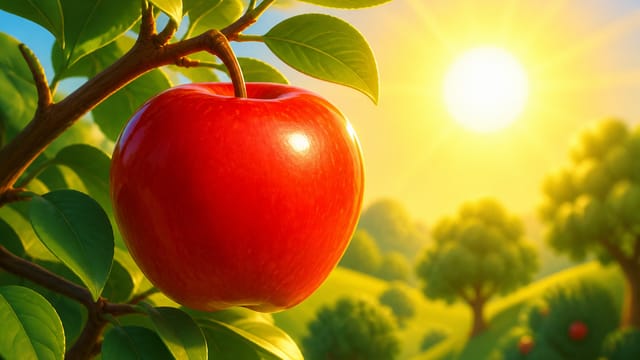
For “Red, red, red — like an apple so bright!” show Gigi happily singing in one clean full-frame shot with one bright red apple clearly visible beside her or in her hand. Make red the obvious focus of the scene.
For “Blue, blue, blue — like the sky in the light!” show Gigi singing under a bright blue sky with soft white clouds. Make blue the obvious focus of the scene.
For “Yellow, yellow — sunshine, warm and fun!” show Gigi with a big warm yellow sun shining nearby and cheerful golden light. Make yellow the obvious focus of the scene.
For “Green, green, green — like the grass in the sun!” show Gigi in a grassy area with bright green grass clearly visible. Use a slightly wider single full-frame shot if needed so the grass is easy for a toddler to see. Make green the obvious focus of the scene.
For “Pink is pretty, purple too,” show Gigi in one clean full-frame scene surrounded by clearly visible pink and purple flowers, hearts, stars, or playful objects. Make both pink and purple easy for a toddler to identify.
For “Orange says, ‘Hello to you!’” show one clear orange object such as an orange balloon, orange flower, or orange star appearing beside Gigi while she sings directly to camera. Make orange the obvious focus of the scene.
For “Rainbow colors, one by one —” show the different colors coming together around Gigi in a magical but simple way, with colorful stars, sparkles, or glowing shapes appearing one after another.
For “Sing with Gigi, colors are fun!” end with one strong happy full-frame shot of Gigi smiling toward camera with a bright rainbow behind her, sparkles around her, and a cheerful finishing pose.
Keep the whole video visually cohesive, clean, simple, and easy for toddlers to follow. Use mostly close-up and waist-up shots, with occasional wider shots only when needed to clearly show the educational object or environment.
Important: never show microphones, microphone stands, stages, concert equipment, singer props, performance props, or audience scenes. Never use split screens, side-by-side shots, multi-panel layouts, collages, picture-in-picture, duplicated Gigi images, tiled compositions, or multiple views on screen. Use one clean full-frame scene at a time.
Do not add extra main characters. Do not create unrelated scenes. Keep Gigi singing, smiling, gently swaying, waving, pointing, bouncing, and moving her hands naturally. Keep her hands empty unless she is holding the specific educational object for that lyric.
Scene prompt example 1
Tight close-up face shot of Gigi (sparkling blue eyes, bright smile, tiara, blonde curls) looking directly at the camera, waving and giggling warmly. A bright red apple appears clearly visible beside her as she begins to sing. Cheerful preschool educational video, mouth fully visible for lip-sync, no microphones.
Scene prompt example 2
Clean full-frame shot of Gigi singing directly to the camera under a bright blue sky with soft white clouds, illuminated by a big warm yellow sun shining nearby with cheerful golden light. Blue and yellow are the focus. Mouth clearly visible, empty hands, no performance props.
Scene prompt example 3
Slightly wider single full-frame shot of Gigi happily singing in a bright grassy area with vibrant green grass clearly visible in the sun. Green is the obvious focus. Her face remains clearly visible for lip-sync, hands natural and empty. Clean preschool video style.
Scene prompts are written automatically from your lyrics - these are examples from this video.
Recipe
TypeMusic video
Format9:16
Image stylePixar-style 3D
Image providerGemini 3 Pro
Video engineKling 2.5 Pro
Scene duration5s
Scenes6
Credits spent446
Sign up free to remixCreate your free account (1,000 free credits in most countries) and remix this recipe with your own words.
Made with TubeTube's AI educational kids video generator.